
Go to Formatting – Conditional fomatting – Contition
Select “Formula is” and enter iseven(row())
Then select “New style”
http://www.computercorrect.com/2010/desktop-applications/openoffice-org/alternating-colors-calc/
Go to Formatting – Conditional fomatting – Contition
Select “Formula is” and enter iseven(row())
Then select “New style”
http://www.computercorrect.com/2010/desktop-applications/openoffice-org/alternating-colors-calc/
img{
	width: 100%;
	background-color: #fff;
	box-shadow: 0 8px 6px -6px rgba(0, 0, 0, 0.8);
	border: thin solid #ccc;
	padding: 10px;
}
The code above gives this result:

As you can see, the 100% width plus 10px padding exceeds the actual available width, so here is the correct code how it should be:
img{
	-webkit-box-sizing: border-box; /* Safari/Chrome, other WebKit */
	-moz-box-sizing: border-box;    /* Firefox, other Gecko */
	box-sizing: border-box;         /* Opera/IE 8+ */
	width: 100%;
	background-color: #fff;
	box-shadow: 0 8px 6px -6px rgba(0, 0, 0, 0.8);
	border: thin solid #ccc;
	padding: 10px;
}

In this example the image with its paddings, margins and border fits inside the available container and 100% is not exceeding it.
More on this topic: http://css-tricks.com/box-sizing/
In LightTable press Ctrl-Space to open Commands pane. Type “settings” and choose “Settings: User keymap”.
It will open keymap configuration. The following configuration adds PageUP and PageDown keyboard shortcuts to switch between opened files and Ctrl-/ shortcut to comment/uncomment current line.
;; User keymap
;; -----------------------------
;; Keymaps are stored as a set of diffs that are merged together together
;; to create the final set of keys. You can modify these diffs to either add
;; or subtract bindings.
;;
;; Like behaviors, keys are bound by tag. When objects with those tags are active
;; the key bindings are live. Keys can be bound to any number of Light Table commands,
;; allowing you the flexibility to execute multiple operations together. To see a list
;; of all the commands you can execute, start typing a word related to the thing you
;; want to do in between the square brackets (e.g. type "editor").

{:+ {:app {}

     :editor {"alt-w" [:editor.watch.watch-selection]
              "alt-shift-w" [:editor.watch.unwatch]
              "pmeta-/" [:toggle-comment-selection]}
     :tabs {"pmeta-pageup" [:tabs.prev]
            "pmeta-pagedown" [:tabs.next]
            }
     }}
To add line numbers or change color theme, you need to configure “User behaviors”. Press Ctrl-Space to open Commands pane, type “settings” and choose “Settings: User behaviors”.
Here is my configuration:
;; User behaviors
;; -----------------------------
;; Behaviors are stored as a set of diffs that are merged together
;; to create the final set of functionality that makes up Light Table. You can
;; modify these diffs to either add or subtract functionality.
;;
;; Behaviors are added to tags, objects with those tags then automatically gain
;; whatever logic the behavior imparts. To see a list of user-level behaviors,
;; start typing a word related to the functionality you want in between the square
;; brackets (e.g. "theme").

{:+ {
     ;; The app tag is kind of like global scope. You assign behaviors that affect
     ;; all of Light Table here
     :app [(:lt.objs.style/set-skin "dark")]

     ;; The editor tag is applied to all editors
     :editor [:lt.objs.editor/wrap
              :lt.objs.editor/line-numbers
              (:lt.objs.style/font-settings "" "12" "1.2")
              (:lt.objs.style/set-theme "monokai")]

     ;; Here we can add behaviors to just clojure editors
     :editor.clojure [(:lt.objs.langs.clj/print-length 1000)]}

 ;; You can use the subtract key to remove behavior that may get added by
 ;; another diff
 :- {:app []}}
http://www.smallbusinessbc.ca/starting-a-business/i-need-a-website-now-what
http://www.intelliplans.com/our-blog/entry/so-you-know-you-need-a-website-now-what.html
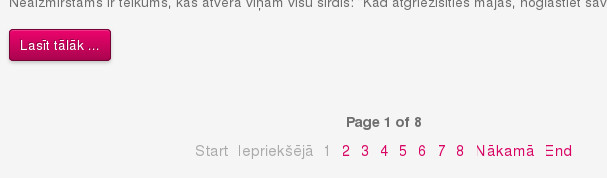
Joomla 3 LV language pack does not have full support for articles pagination.
The strings that are not translated are in en-GB.lib_joomla.ini file. However, there is nosuch file for Latvian. I had to create lv-LV.lib_joomla.ini, paste contents of appropriate EN file and translate corresponding lines, like:
JLIB_HTML_START="Start"
to
JLIB_HTML_START="Pirmā"
ALTER TABLE mytable CONVERT TO CHARACTER SET utf8
PhD does not come for free. Here I summarize the expenses I had to cover to defend my Thesis in Latvia University of Agriculture.
PHP can fail to connect to a MySQL database when a custom port number is specified.
In the old-style you would write like this:
$link = mysql_connect("dbhost.info:6603", "dbuser", "dbpaswd",);
Now with mysqli the same approach does not work.
$mysqli = new mysqli("dbhost.info:6603", "dbuser", "dbpaswd", "databasename");
If you try to connect this way using mysqli, it will fail with an error Unknow server host ‘dbhost.info:6603’:
By default it is not possible to swap article title and intro image nor rearrange other article properties.
The solution for this problem is called a template override. The idea is to make copies of certain Joomla! core files, modify them (rearrange code blocks) and save them in specific places.


Continue reading Place intro image before article title in Joomla! 3
Install Asciidoc and DocBook
yum install asciidoc

yum install docbook-dtds

yum install publican

yum install dblatex

yum install libxml2-devel

yum install libxslt docbook5-style-xsl docbook-utils
To generate PDF files LaTeX is required. See here how to install LaTeX and XeLaTeX on Fedora.
Generate html file from asciidoc file
asciidoc myfile.txt
Use ‘-n’ to have numbered sections
asciidoc -n myfile.txt
Generate PDF file
Although it is possible to directly create PDF files using a2x utility, I prefer to convert my file to docbook format and then to PDF.
asciidoc -n --doctype=article --backend=docbook45 myfile.txt
or
asciidoc --doctype=book --backend=docbook45 myfile.txt
Then
dblatex gramata.xml
or
dblatex --backend=xetex gramata.xml