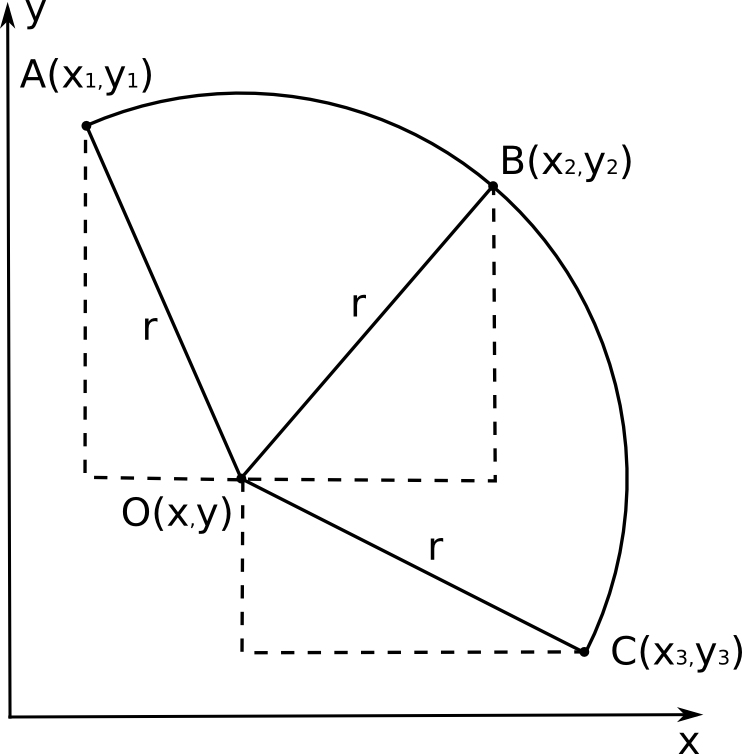
Punktu A, B, C koordinātes ir zināmas no mērījumiem– tās ir attiecīgi x1, y1, x2, y2, x3, y3. Riņķa līnijas centrs ir punkts O, kura koordinātes x, y nav zināmas. Izmantojot Pitagora teorēmu, varam uzrakstīt 3 vienādojumu sistēmu, kas saista zināmās koordinātes ar x, y un meklējamo rādiusu r:
(x – x1)2 + (y – y1)2 = r2
(x – x2)2 + (y – y2)2 = r2
(x – x3)2 + (y – y3)2 = r2
Vienādojumu sistēmu var risināt, piemēram, no pirmā vienādojuma atņemot otro – iegūsim sakarību y(x), ko tālāk var ievietot trešajā vienādojumā. Tomēr izteiksmes ātri kļūst pārāk garas aprēķiniem “ar roku”. Izmantosim vienu no brīvi pieejamajām datoralgebras programmām – Maxima (versija 5.27.0, http://maxima.sourceforge.net).
Vienādojumu sistēma kā uzdevums programmai Maxima izskatās šādi:
eq_1: (x - x1)^2 + (y - y1)^2 = r^2$

eq_2: (x - x2)^2 + (y - y2)^2 = r^2$

eq_3: (x - x3)^2 + (y - y3)^2 = r^2$

solve ([eq_1, eq_2, eq_3],[x,y,r]);
Rādiusam r programma sniedz risinājumu:
r=(sqrt(y2^2*y3^4-2*y1*y2*y3^4+y1^2*y3^4+x2^2*y3^4-2*x1*x2*y3^4+x1^2*

y3^4-2*y2^3*y3^3+2*y1*y2^2*y3^3+2*y1^2*y2*y3^3-2*x2^2*y2*y3^3+4*x1*x2*y2*y3^3-2*x1^2*y2*y3^3-2*y1^3*y3^3-2*x2^2*y1*y3^3+4*x1*x2*y1*y3^3-2*x1^2*y1*y3^3+

y2^4*y3^2+2*y1*y2^3*y3^2-6*y1^2*y2^2*y3^2+2*x3^2*y2^2*y3^2-2*x2*x3*y2^2*y3^2-2*x1*x3*y2^2*y3^2+2*x2^2*y2^2*y3^2-2*x1*x2*y2^2*y3^2+2*x1^2*y2^2*y3^2+2*y1^3*y2*

y3^2-4*x3^2*y1*y2*y3^2+4*x2*x3*y1*y2*y3^2+4*x1*x3*y1*y2*y3^2+2*x2^2*y1*y2*y3^2-8*x1*x2*y1*y2*y3^2+2*x1^2*y1*y2*y3^2+y1^4*y3^2+2*x3^2*y1^2*y3^2-2*x2*x3*

y1^2*y3^2-2*x1*x3*y1^2*y3^2+2*x2^2*y1^2*y3^2-2*x1*x2*y1^2*y3^2+2*x1^2*y1^2*y3^2+2*x2^2*x3^2*y3^2-4*x1*x2*x3^2*y3^2+2*x1^2*x3^2*y3^2-2*x2^3*x3*y3^2+2*x1*x2^2*x3

*y3^2+2*x1^2*x2*x3*y3^2-2*x1^3*x3*y3^2+x2^4*y3^2-2*x1*x2^3*y3^2+2*x1^2*x2^2*y3^2-2*x1^3*x2*y3^2+x1^4*y3^2-2*y1*y2^4*y3+2*y1^2*y2^3*y3-2*x3^2*y2^3*y3+4*x1*

x3*y2^3*y3-2*x1^2*y2^3*y3+2*y1^3*y2^2*y3+2*x3^2*y1*y2^2*y3+4*x2*x3*y1*y2^2*y3-8*x1*x3*y1*y2^2*y3-4*x2^2*y1*y2^2*y3+4*x1*x2*y1*y2^2*y3+2*x1^2*y1*y2^2*y3

-2*y1^4*y2*y3+2*x3^2*y1^2*y2*y3-8*x2*x3*y1^2*y2*y3+4*x1*x3*y1^2*y2*y3+2*x2^2*y1^2*y2*y3+4*x1*x2*y1^2*y2*y3-4*x1^2*y1^2*y2*y3-2*x2^2*x3^2*y2*y3+4*x1*

x2*x3^2*y2*y3-2*x1^2*x3^2*y2*y3+4*x1*x2^2*x3*y2*y3-8*x1^2*x2*x3*y2*y3+4*x1^3*x3*y2*y3-2*x1^2*x2^2*y2*y3+4*x1^3*x2*y2*y3-2*x1^4*y2*y3-2*x3^2*y1^3*y3+4

*x2*x3*y1^3*y3-2*x2^2*y1^3*y3-2*x2^2*x3^2*y1*y3+4*x1*x2*x3^2*y1*y3-2*x1^2*x3^2*y1*y3+4*x2^3*x3*y1*y3-8*x1*x2^2*x3*y1*y3+4*x1^2*x2*x3*y1*y3-2*x2^4*y1*

y3+4*x1*x2^3*y1*y3-2*x1^2*x2^2*y1*y3+y1^2*y2^4+x3^2*y2^4-2*x1*x3*y2^4+x1^2*y2^4-2*y1^3*y2^3-2*x3^2*y1*y2^3+4*x1*x3*y1*y2^3-2*x1^2*y1*y2^3+y1^4*y2^2+2*

x3^2*y1^2*y2^2-2*x2*x3*y1^2*y2^2-2*x1*x3*y1^2*y2^2+2*x2^2*y1^2*y2^2-2*x1*x2*y1^2*y2^2+2*x1^2*y1^2*y2^2+x3^4*y2^2-2*x2*x3^3*y2^2-2*x1*x3^3*y2^2+2*x2^2*x3^2*y2^2

+2*x1*x2*x3^2*y2^2+2*x1^2*x3^2*y2^2-4*x1*x2^2*x3*y2^2+2*x1^2*x2*x3*y2^2-2*x1^3*x3*y2^2+2*x1^2*x2^2*y2^2-2*x1^3*x2*y2^2+x1^4*y2^2-2*x3^2*y1^3*y2+4*x2*x3*y1^3*

y2-2*x2^2*y1^3*y2-2*x3^4*y1*y2+4*x2*x3^3*y1*y2+4*x1*x3^3*y1*y2-2*x2^2*x3^2*y1*y2-8*x1*x2*x3^2*y1*y2-2*x1^2*x3^2*y1*y2+4*x1*x2^2*x3*y1*y2+4*x1^2*x2*x3

*y1*y2-2*x1^2*x2^2*y1*y2+x3^2*y1^4-2*x2*x3*y1^4+x2^2*y1^4+x3^4*y1^2-2*x2*x3^3*y1^2-2*x1*x3^3*y1^2+2*x2^2*x3^2*y1^2+2*x1*x2*x3^2*y1^2+2*x1^2*x3^2*y1^2-2*x2^3*

x3*y1^2+2*x1*x2^2*x3*y1^2-4*x1^2*x2*x3*y1^2+x2^4*y1^2-2*x1*x2^3*y1^2+2*x1^2*x2^2*y1^2+x2^2*x3^4-2*x1*x2*x3^4+x1^2*x3^4-2*x2^3*x3^3+2*x1*x2^2*x3^3+2*x1^2*x2*

x3^3-2*x1^3*x3^3+x2^4*x3^2+2*x1*x2^3*x3^2-6*x1^2*x2^2*x3^2+2*x1^3*x2*x3^2+x1^4*x3^2-2*x1*x2^4*x3+2*x1^2*x2^3*x3+2*x1^3*x2^2*x3-2*x1^4*x2*x3+x1^2*x2^4-2*x1^3

*x2^3+x1^4*x2^2))/((2*x2-2*x1)*y3+(2*x1-2*x3)*y2+(2*x3-2*x2)*y1)
Redzams, ka meklēto rādiusu r var aprēķināt no 6 zināmajiem skaitļiem – koordinātēm x1, y1, x2, y2, x3, y3 – izmantojot tikai vienkāršas aritmētiskās darbības.
Atrisinājumā ir dalīšana ar izteiksmi
(2*x2-2*x1)*y3+(2*x1-2*x3)*y2+(2*x3-2*x2)*y1
Šīs izteiksmes vērtība kļūst vienāda ar 0, ja visi trīs punkti A, B un C atrodas uz vienas taisnes – to var iztēloties kā pagriezienu, kura rādiuss ir bezgalīgi liels.
Varam pārbaudīt izteiksmes pareizību ar vienkāršu piemēru programmā Maxima:
x1: 1;

y1: 0;

x2: 0;

y2: 1;

x3: -1;

y3: 0;
r: (sqrt(y2^2*y3^4-2*y1*y2*y3^4+y1^2*y3^4+x2^2*y3^4-2*x1*x2*y3^4+x1^2*

y3^4-2*y2^3*y3^3+2*y1*y2^2*y3^3+2*y1^2*y2*y3^3-2*x2^2*y2*y3^3+4*x1*x2*y2*y3^3-2*x1^2*y2*y3^3-2*y1^3*y3^3-2*x2^2*y1*y3^3+4*x1*x2*y1*y3^3-2*x1^2*y1*y3^3+

y2^4*y3^2+2*y1*y2^3*y3^2-6*y1^2*y2^2*y3^2+2*x3^2*y2^2*y3^2-2*x2*x3*y2^2*y3^2-2*x1*x3*y2^2*y3^2+2*x2^2*y2^2*y3^2-2*x1*x2*y2^2*y3^2+2*x1^2*y2^2*y3^2+2*y1^3*y2*

y3^2-4*x3^2*y1*y2*y3^2+4*x2*x3*y1*y2*y3^2+4*x1*x3*y1*y2*y3^2+2*x2^2*y1*y2*y3^2-8*x1*x2*y1*y2*y3^2+2*x1^2*y1*y2*y3^2+y1^4*y3^2+2*x3^2*y1^2*y3^2-2*x2*x3*

y1^2*y3^2-2*x1*x3*y1^2*y3^2+2*x2^2*y1^2*y3^2-2*x1*x2*y1^2*y3^2+2*x1^2*y1^2*y3^2+2*x2^2*x3^2*y3^2-4*x1*x2*x3^2*y3^2+2*x1^2*x3^2*y3^2-2*x2^3*x3*y3^2+2*x1*x2^2*x3

*y3^2+2*x1^2*x2*x3*y3^2-2*x1^3*x3*y3^2+x2^4*y3^2-2*x1*x2^3*y3^2+2*x1^2*x2^2*y3^2-2*x1^3*x2*y3^2+x1^4*y3^2-2*y1*y2^4*y3+2*y1^2*y2^3*y3-2*x3^2*y2^3*y3+4*x1*

x3*y2^3*y3-2*x1^2*y2^3*y3+2*y1^3*y2^2*y3+2*x3^2*y1*y2^2*y3+4*x2*x3*y1*y2^2*y3-8*x1*x3*y1*y2^2*y3-4*x2^2*y1*y2^2*y3+4*x1*x2*y1*y2^2*y3+2*x1^2*y1*y2^2*y3

-2*y1^4*y2*y3+2*x3^2*y1^2*y2*y3-8*x2*x3*y1^2*y2*y3+4*x1*x3*y1^2*y2*y3+2*x2^2*y1^2*y2*y3+4*x1*x2*y1^2*y2*y3-4*x1^2*y1^2*y2*y3-2*x2^2*x3^2*y2*y3+4*x1*

x2*x3^2*y2*y3-2*x1^2*x3^2*y2*y3+4*x1*x2^2*x3*y2*y3-8*x1^2*x2*x3*y2*y3+4*x1^3*x3*y2*y3-2*x1^2*x2^2*y2*y3+4*x1^3*x2*y2*y3-2*x1^4*y2*y3-2*x3^2*y1^3*y3+4

*x2*x3*y1^3*y3-2*x2^2*y1^3*y3-2*x2^2*x3^2*y1*y3+4*x1*x2*x3^2*y1*y3-2*x1^2*x3^2*y1*y3+4*x2^3*x3*y1*y3-8*x1*x2^2*x3*y1*y3+4*x1^2*x2*x3*y1*y3-2*x2^4*y1*

y3+4*x1*x2^3*y1*y3-2*x1^2*x2^2*y1*y3+y1^2*y2^4+x3^2*y2^4-2*x1*x3*y2^4+x1^2*y2^4-2*y1^3*y2^3-2*x3^2*y1*y2^3+4*x1*x3*y1*y2^3-2*x1^2*y1*y2^3+y1^4*y2^2+2*

x3^2*y1^2*y2^2-2*x2*x3*y1^2*y2^2-2*x1*x3*y1^2*y2^2+2*x2^2*y1^2*y2^2-2*x1*x2*y1^2*y2^2+2*x1^2*y1^2*y2^2+x3^4*y2^2-2*x2*x3^3*y2^2-2*x1*x3^3*y2^2+2*x2^2*x3^2*y2^2

+2*x1*x2*x3^2*y2^2+2*x1^2*x3^2*y2^2-4*x1*x2^2*x3*y2^2+2*x1^2*x2*x3*y2^2-2*x1^3*x3*y2^2+2*x1^2*x2^2*y2^2-2*x1^3*x2*y2^2+x1^4*y2^2-2*x3^2*y1^3*y2+4*x2*x3*y1^3*

y2-2*x2^2*y1^3*y2-2*x3^4*y1*y2+4*x2*x3^3*y1*y2+4*x1*x3^3*y1*y2-2*x2^2*x3^2*y1*y2-8*x1*x2*x3^2*y1*y2-2*x1^2*x3^2*y1*y2+4*x1*x2^2*x3*y1*y2+4*x1^2*x2*x3

*y1*y2-2*x1^2*x2^2*y1*y2+x3^2*y1^4-2*x2*x3*y1^4+x2^2*y1^4+x3^4*y1^2-2*x2*x3^3*y1^2-2*x1*x3^3*y1^2+2*x2^2*x3^2*y1^2+2*x1*x2*x3^2*y1^2+2*x1^2*x3^2*y1^2-2*x2^3*

x3*y1^2+2*x1*x2^2*x3*y1^2-4*x1^2*x2*x3*y1^2+x2^4*y1^2-2*x1*x2^3*y1^2+2*x1^2*x2^2*y1^2+x2^2*x3^4-2*x1*x2*x3^4+x1^2*x3^4-2*x2^3*x3^3+2*x1*x2^2*x3^3+2*x1^2*x2*

x3^3-2*x1^3*x3^3+x2^4*x3^2+2*x1*x2^3*x3^2-6*x1^2*x2^2*x3^2+2*x1^3*x2*x3^2+x1^4*x3^2-2*x1*x2^4*x3+2*x1^2*x2^3*x3+2*x1^3*x2^2*x3-2*x1^4*x2*x3+x1^2*x2^4-2*x1^3

*x2^3+x1^4*x2^2))/((2*x2-2*x1)*y3+(2*x1-2*x3)*y2+(2*x3-2*x2)*y1);
 1

 0

 0

 1

 -1

 0

1.0   <---- aprēķinātais rādiuss ir pareizs.
Mēģinājumi vienkāršot atrisinājumu, savelkot līdzīgos locekļus vai iznesot pirms iekavām kopējos reizinātājus, nedod būtiskus rezultātus. Apjomīgā izteiksme varētu būt pārsteigums – kāpēc tik vienkāršam uzdevumam ir tik sarežģīts atrisinājums. Domāju, ka izskaidrojums varētu būt tajā, ka katrs no 6 skaitļiem (koordinātēm) ietekmē rezultātu (rādiusu) sarežģītā mijiedarbībā ar katru no pārējiem 5 skaitļiem, tādēļ arī izteiksmē tik daudz locekļu, kur katra koordināte reizināta pati ar sevi un citām koordinātēm dažādās pakāpēs.
Mg.phys. Andris Mednis