Things to do after fresh Fedora 20 install

Open a terminal and become root
su -

Add RPM fusion repository

yum localinstall --nogpgcheck http://download1.rpmfusion.org/free/fedora/rpmfusion-free-release-$(rpm -E %fedora).noarch.rpm http://download1.rpmfusion.org/nonfree/fedora/rpmfusion-nonfree-release-$(rpm -E %fedora).noarch.rpm

Install Flash plugin for 64bit systems
yum install http://linuxdownload.adobe.com/adobe-release/adobe-release-x86_64-1.0-1.noarch.rpm -y
yum install flash-plugin nspluginwrapper alsa-plugins-pulseaudio libcurl

Read more about playing flash here.

Install applications according to your needs

yum install gnome-tweak-tool
yum install dconf-editor
yum install gimp
yum install inkscape
yum install thunderbird
yum install bluefish
yum install filezilla
yum install vlc
yum install python-openoffice
yum install VirtualBox

Gnome Weather and Gnome Maps in Fedora 20

Install Gnome weather and Gnome maps
yum install gnome-weather
yum install gnome-maps

Fix AltTab behavior so it switches windows only on the active workspace
https://extensions.gnome.org/extension/15/alternatetab/ (does not group windows by application)

Install Chromium browser

Place the repo file and save it as /etc/yum.repos.d/churchyard-chromium-russianfedora.repo

yum install chromium

Enable mp3 and DVD playback
rpm -Uvh http://rpm.livna.org/livna-release.rpm

yum install gstreamer-plugins-bad gstreamer-plugins-bad-free-extras gstreamer-plugins-bad-nonfree gstreamer-plugins-ugly gstreamer-ffmpeg ffmpeg mencoder ffmpeg2theora mplayer libdvdcss

yum install gstreamer1-libav gstreamer1-plugins-bad-free-extras gstreamer1-plugins-bad-freeworld gstreamer1-plugins-base-tools gstreamer1-plugins-good-extras gstreamer1-plugins-ugly gstreamer1-plugins-bad-free gstreamer1-plugins-good gstreamer1-plugins-base gstreamer1

yum install libdvdread libdvdnav lsdvd libdvdcss libdvdcss2

See also: How to install LaTeX and XeLaTeX in Fedora

libSBML 5.8.0 in Fedora 19 with Python bindings

How to install libSBML 5.8.0 in Fedora 19 with Python bindings

Install compiler
yum install gcc-c++
yum groupinstall "Development Tools"

Install some additional packages if needed
yum install python-devel
yum install libxml2-devel
yum install swig

Compile and install libSBML
Go to the directory where you have exctracted libsbml source and run these 3 commands
./configure --with-python
make
make install

Make libsbml accessible to Python
In Fedora 18 you would export full path to libsbml:
export PYTHONPATH=/usr/local/lib64/python2.7/site-packages/libsbmlIn Fedora 18 you would import _libsbml not just import libsbml.

In Fedora 19 you have to export path like this:
export PYTHONPATH=/usr/local/lib64/python2.7/site-packages/

The export command expires when user leaves his/her session.

Use the libSBML in your code
import libsbml

Using Android phone without Google account

If you have ever wondered how usable Android phone is without having Google account, most probably you have already discovered the ugly truth – Android phone is a trap. There is no visible chance to have a smartphone (with apps and so on) without having Gmail account. Majority of Alternative Markets, like GetJar, are available only from Google Play.
Sadly, most developers publish their Android apps only in Play store. You can’t download or buy their apps from developers websites. You can’t even download APK files to your computer using fake gmail account. And when you give up and enter your Gmail credentials in your Android phone there is no turning back – you can’t just disconnect your phone from Google.

In this article I share my experience and guidelines on using Android phone avoiding Google Play store.

Continue reading Using Android phone without Google account

htaccess allow IP addresses

If your website is under construction, you can simply edit .htaccess file to disallow visits to your website.
Here is the code :
<Limit GET POST PUT>
order deny,allow
deny from all
allow from 12.345.67.890
</Limit>

allow from 12.345.67.890 command allows access to your server only from 12.345.67.890 IP address.

You can allow more IP’s to access your website :
<Limit GET POST PUT>
order deny,allow
deny from all
allow from 12.345.67.890
allow from 890.67.345.12
</Limit>

This practice is good in case you are modifying your website (performing a new joomla installation) and don’t want others to see the process.

Original source: http://htaccessfile.com/htaccess-allow-ip-addresses

Things to do after fresh Fedora 19 install

Add RPM fusion repository
Download RPM fusion package from http://rpmfusion.org/Configuration
Add it
yum localinstall –nogpgcheck rpmfusion-free-release-19.noarch.rpm
yum localinstall –nogpgcheck rpmfusion-nonfree-release-19.noarch.rpm

Install Flash plugin for 64bit systems
yum install http://linuxdownload.adobe.com/adobe-release/adobe-release-x86_64-1.0-1.noarch.rpm -y
Read more about playing flash here.

Install applications according to your needs
yum install gnome-tweak-tool
yum install gimp
yum install inkscape
yum install thunderbird

yum install vlc
yum install VirtualBox
yum install filezilla
yum install bluefish
yum install python-openoffice

Fix AltTab behavior so it switches windows only on the active workspace
https://extensions.gnome.org/extension/15/alternatetab/ (does not group windows by application)
https://extensions.gnome.org/extension/310/alt-tab-workspace/ (groups windows by application)

Fix keyboard shortcuts for static workspaces
yum install dconf-editor
In dconf-editor go to org → gnome → desktop → wm → keybindings
fix_keyboard_shortcuts
You have to disable dynamic workspaces prior to this.

Enable DVD playback
rpm -Uvh http://rpm.livna.org/livna-release.rpm
yum -y install gstreamer-plugins-bad gstreamer-plugins-bad-free-extras gstreamer-plugins-bad-nonfree gstreamer-plugins-ugly gstreamer-ffmpeg ffmpeg mencoder ffmpeg2theora mplayer libdvdcss
yum -y install gstreamer1-libav gstreamer1-plugins-bad-free-extras gstreamer1-plugins-bad-freeworld gstreamer1-plugins-base-tools gstreamer1-plugins-good-extras gstreamer1-plugins-ugly gstreamer1-plugins-bad-free gstreamer1-plugins-good gstreamer1-plugins-base gstreamer1
yum -y install libdvdread libdvdnav lsdvd libdvdcss libdvdcss2

Chromium web browser
yum-config-manager --add-repo=http://repos.fedorapeople.org/repos/spot/chromium-stable/fedora-chromium-stable.repo
yum install chromium -y

Read more about Chromium web browser here.

See also: How to install LaTeX and XeLaTeX in Fedora

[How to] Trajektorijas pagrieziena rādiusa aprēķināšana zinot 3 punktu koordinātes

pagrieziena_radiuss

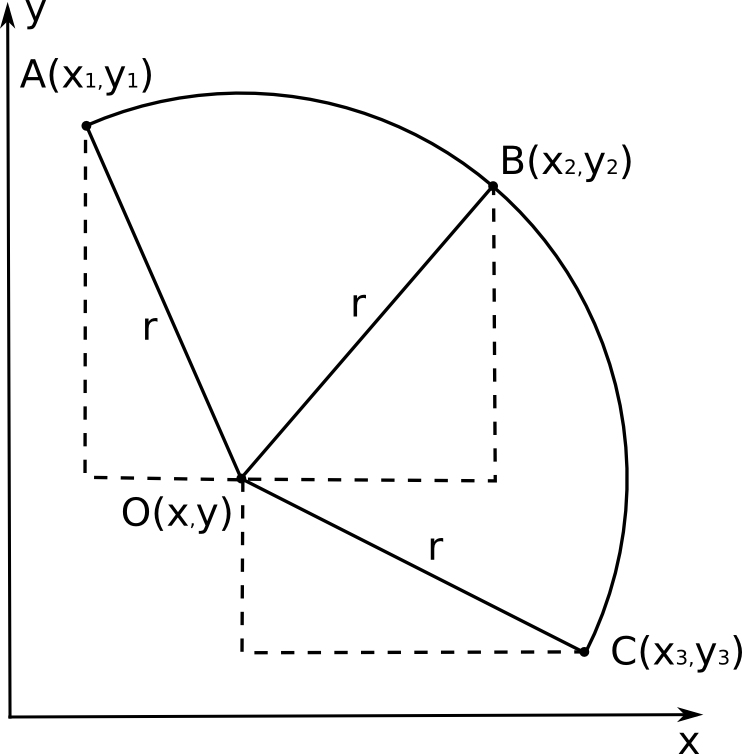
Punktu A, B, C koordinātes ir zināmas no mērījumiem– tās ir attiecīgi x1, y1, x2, y2, x3, y3. Riņķa līnijas centrs ir punkts O, kura koordinātes x, y nav zināmas. Izmantojot Pitagora teorēmu, varam uzrakstīt 3 vienādojumu sistēmu, kas saista zināmās koordinātes ar x, y un meklējamo rādiusu r:

(x – x1)2 + (y – y1)2 = r2
(x – x2)2 + (y – y2)2 = r2
(x – x3)2 + (y – y3)2 = r2

Vienādojumu sistēmu var risināt, piemēram, no pirmā vienādojuma atņemot otro – iegūsim sakarību y(x), ko tālāk var ievietot trešajā vienādojumā. Tomēr izteiksmes ātri kļūst pārāk garas aprēķiniem “ar roku”. Izmantosim vienu no brīvi pieejamajām datoralgebras programmām – Maxima (versija 5.27.0, http://maxima.sourceforge.net).

Vienādojumu sistēma kā uzdevums programmai Maxima izskatās šādi:

eq_1: (x - x1)^2 + (y - y1)^2 = r^2$
eq_2: (x - x2)^2 + (y - y2)^2 = r^2$
eq_3: (x - x3)^2 + (y - y3)^2 = r^2$
solve ([eq_1, eq_2, eq_3],[x,y,r]);

Rādiusam r programma sniedz risinājumu:

r=(sqrt(y2^2*y3^4-2*y1*y2*y3^4+y1^2*y3^4+x2^2*y3^4-2*x1*x2*y3^4+x1^2*
y3^4-2*y2^3*y3^3+2*y1*y2^2*y3^3+2*y1^2*y2*y3^3-2*x2^2*y2*y3^3+4*x1*x2*y2*y3^3-2*x1^2*y2*y3^3-2*y1^3*y3^3-2*x2^2*y1*y3^3+4*x1*x2*y1*y3^3-2*x1^2*y1*y3^3+
y2^4*y3^2+2*y1*y2^3*y3^2-6*y1^2*y2^2*y3^2+2*x3^2*y2^2*y3^2-2*x2*x3*y2^2*y3^2-2*x1*x3*y2^2*y3^2+2*x2^2*y2^2*y3^2-2*x1*x2*y2^2*y3^2+2*x1^2*y2^2*y3^2+2*y1^3*y2*
y3^2-4*x3^2*y1*y2*y3^2+4*x2*x3*y1*y2*y3^2+4*x1*x3*y1*y2*y3^2+2*x2^2*y1*y2*y3^2-8*x1*x2*y1*y2*y3^2+2*x1^2*y1*y2*y3^2+y1^4*y3^2+2*x3^2*y1^2*y3^2-2*x2*x3*
y1^2*y3^2-2*x1*x3*y1^2*y3^2+2*x2^2*y1^2*y3^2-2*x1*x2*y1^2*y3^2+2*x1^2*y1^2*y3^2+2*x2^2*x3^2*y3^2-4*x1*x2*x3^2*y3^2+2*x1^2*x3^2*y3^2-2*x2^3*x3*y3^2+2*x1*x2^2*x3
*y3^2+2*x1^2*x2*x3*y3^2-2*x1^3*x3*y3^2+x2^4*y3^2-2*x1*x2^3*y3^2+2*x1^2*x2^2*y3^2-2*x1^3*x2*y3^2+x1^4*y3^2-2*y1*y2^4*y3+2*y1^2*y2^3*y3-2*x3^2*y2^3*y3+4*x1*
x3*y2^3*y3-2*x1^2*y2^3*y3+2*y1^3*y2^2*y3+2*x3^2*y1*y2^2*y3+4*x2*x3*y1*y2^2*y3-8*x1*x3*y1*y2^2*y3-4*x2^2*y1*y2^2*y3+4*x1*x2*y1*y2^2*y3+2*x1^2*y1*y2^2*y3
-2*y1^4*y2*y3+2*x3^2*y1^2*y2*y3-8*x2*x3*y1^2*y2*y3+4*x1*x3*y1^2*y2*y3+2*x2^2*y1^2*y2*y3+4*x1*x2*y1^2*y2*y3-4*x1^2*y1^2*y2*y3-2*x2^2*x3^2*y2*y3+4*x1*
x2*x3^2*y2*y3-2*x1^2*x3^2*y2*y3+4*x1*x2^2*x3*y2*y3-8*x1^2*x2*x3*y2*y3+4*x1^3*x3*y2*y3-2*x1^2*x2^2*y2*y3+4*x1^3*x2*y2*y3-2*x1^4*y2*y3-2*x3^2*y1^3*y3+4
*x2*x3*y1^3*y3-2*x2^2*y1^3*y3-2*x2^2*x3^2*y1*y3+4*x1*x2*x3^2*y1*y3-2*x1^2*x3^2*y1*y3+4*x2^3*x3*y1*y3-8*x1*x2^2*x3*y1*y3+4*x1^2*x2*x3*y1*y3-2*x2^4*y1*
y3+4*x1*x2^3*y1*y3-2*x1^2*x2^2*y1*y3+y1^2*y2^4+x3^2*y2^4-2*x1*x3*y2^4+x1^2*y2^4-2*y1^3*y2^3-2*x3^2*y1*y2^3+4*x1*x3*y1*y2^3-2*x1^2*y1*y2^3+y1^4*y2^2+2*
x3^2*y1^2*y2^2-2*x2*x3*y1^2*y2^2-2*x1*x3*y1^2*y2^2+2*x2^2*y1^2*y2^2-2*x1*x2*y1^2*y2^2+2*x1^2*y1^2*y2^2+x3^4*y2^2-2*x2*x3^3*y2^2-2*x1*x3^3*y2^2+2*x2^2*x3^2*y2^2
+2*x1*x2*x3^2*y2^2+2*x1^2*x3^2*y2^2-4*x1*x2^2*x3*y2^2+2*x1^2*x2*x3*y2^2-2*x1^3*x3*y2^2+2*x1^2*x2^2*y2^2-2*x1^3*x2*y2^2+x1^4*y2^2-2*x3^2*y1^3*y2+4*x2*x3*y1^3*
y2-2*x2^2*y1^3*y2-2*x3^4*y1*y2+4*x2*x3^3*y1*y2+4*x1*x3^3*y1*y2-2*x2^2*x3^2*y1*y2-8*x1*x2*x3^2*y1*y2-2*x1^2*x3^2*y1*y2+4*x1*x2^2*x3*y1*y2+4*x1^2*x2*x3
*y1*y2-2*x1^2*x2^2*y1*y2+x3^2*y1^4-2*x2*x3*y1^4+x2^2*y1^4+x3^4*y1^2-2*x2*x3^3*y1^2-2*x1*x3^3*y1^2+2*x2^2*x3^2*y1^2+2*x1*x2*x3^2*y1^2+2*x1^2*x3^2*y1^2-2*x2^3*
x3*y1^2+2*x1*x2^2*x3*y1^2-4*x1^2*x2*x3*y1^2+x2^4*y1^2-2*x1*x2^3*y1^2+2*x1^2*x2^2*y1^2+x2^2*x3^4-2*x1*x2*x3^4+x1^2*x3^4-2*x2^3*x3^3+2*x1*x2^2*x3^3+2*x1^2*x2*
x3^3-2*x1^3*x3^3+x2^4*x3^2+2*x1*x2^3*x3^2-6*x1^2*x2^2*x3^2+2*x1^3*x2*x3^2+x1^4*x3^2-2*x1*x2^4*x3+2*x1^2*x2^3*x3+2*x1^3*x2^2*x3-2*x1^4*x2*x3+x1^2*x2^4-2*x1^3
*x2^3+x1^4*x2^2))/((2*x2-2*x1)*y3+(2*x1-2*x3)*y2+(2*x3-2*x2)*y1)

Redzams, ka meklēto rādiusu r var aprēķināt no 6 zināmajiem skaitļiem – koordinātēm x1, y1, x2, y2, x3, y3 – izmantojot tikai vienkāršas aritmētiskās darbības.
Atrisinājumā ir dalīšana ar izteiksmi

(2*x2-2*x1)*y3+(2*x1-2*x3)*y2+(2*x3-2*x2)*y1

Šīs izteiksmes vērtība kļūst vienāda ar 0, ja visi trīs punkti A, B un C atrodas uz vienas taisnes – to var iztēloties kā pagriezienu, kura rādiuss ir bezgalīgi liels.
Varam pārbaudīt izteiksmes pareizību ar vienkāršu piemēru programmā Maxima:

x1: 1;
y1: 0;
x2: 0;
y2: 1;
x3: -1;
y3: 0;

r: (sqrt(y2^2*y3^4-2*y1*y2*y3^4+y1^2*y3^4+x2^2*y3^4-2*x1*x2*y3^4+x1^2*
y3^4-2*y2^3*y3^3+2*y1*y2^2*y3^3+2*y1^2*y2*y3^3-2*x2^2*y2*y3^3+4*x1*x2*y2*y3^3-2*x1^2*y2*y3^3-2*y1^3*y3^3-2*x2^2*y1*y3^3+4*x1*x2*y1*y3^3-2*x1^2*y1*y3^3+
y2^4*y3^2+2*y1*y2^3*y3^2-6*y1^2*y2^2*y3^2+2*x3^2*y2^2*y3^2-2*x2*x3*y2^2*y3^2-2*x1*x3*y2^2*y3^2+2*x2^2*y2^2*y3^2-2*x1*x2*y2^2*y3^2+2*x1^2*y2^2*y3^2+2*y1^3*y2*
y3^2-4*x3^2*y1*y2*y3^2+4*x2*x3*y1*y2*y3^2+4*x1*x3*y1*y2*y3^2+2*x2^2*y1*y2*y3^2-8*x1*x2*y1*y2*y3^2+2*x1^2*y1*y2*y3^2+y1^4*y3^2+2*x3^2*y1^2*y3^2-2*x2*x3*
y1^2*y3^2-2*x1*x3*y1^2*y3^2+2*x2^2*y1^2*y3^2-2*x1*x2*y1^2*y3^2+2*x1^2*y1^2*y3^2+2*x2^2*x3^2*y3^2-4*x1*x2*x3^2*y3^2+2*x1^2*x3^2*y3^2-2*x2^3*x3*y3^2+2*x1*x2^2*x3
*y3^2+2*x1^2*x2*x3*y3^2-2*x1^3*x3*y3^2+x2^4*y3^2-2*x1*x2^3*y3^2+2*x1^2*x2^2*y3^2-2*x1^3*x2*y3^2+x1^4*y3^2-2*y1*y2^4*y3+2*y1^2*y2^3*y3-2*x3^2*y2^3*y3+4*x1*
x3*y2^3*y3-2*x1^2*y2^3*y3+2*y1^3*y2^2*y3+2*x3^2*y1*y2^2*y3+4*x2*x3*y1*y2^2*y3-8*x1*x3*y1*y2^2*y3-4*x2^2*y1*y2^2*y3+4*x1*x2*y1*y2^2*y3+2*x1^2*y1*y2^2*y3
-2*y1^4*y2*y3+2*x3^2*y1^2*y2*y3-8*x2*x3*y1^2*y2*y3+4*x1*x3*y1^2*y2*y3+2*x2^2*y1^2*y2*y3+4*x1*x2*y1^2*y2*y3-4*x1^2*y1^2*y2*y3-2*x2^2*x3^2*y2*y3+4*x1*
x2*x3^2*y2*y3-2*x1^2*x3^2*y2*y3+4*x1*x2^2*x3*y2*y3-8*x1^2*x2*x3*y2*y3+4*x1^3*x3*y2*y3-2*x1^2*x2^2*y2*y3+4*x1^3*x2*y2*y3-2*x1^4*y2*y3-2*x3^2*y1^3*y3+4
*x2*x3*y1^3*y3-2*x2^2*y1^3*y3-2*x2^2*x3^2*y1*y3+4*x1*x2*x3^2*y1*y3-2*x1^2*x3^2*y1*y3+4*x2^3*x3*y1*y3-8*x1*x2^2*x3*y1*y3+4*x1^2*x2*x3*y1*y3-2*x2^4*y1*
y3+4*x1*x2^3*y1*y3-2*x1^2*x2^2*y1*y3+y1^2*y2^4+x3^2*y2^4-2*x1*x3*y2^4+x1^2*y2^4-2*y1^3*y2^3-2*x3^2*y1*y2^3+4*x1*x3*y1*y2^3-2*x1^2*y1*y2^3+y1^4*y2^2+2*
x3^2*y1^2*y2^2-2*x2*x3*y1^2*y2^2-2*x1*x3*y1^2*y2^2+2*x2^2*y1^2*y2^2-2*x1*x2*y1^2*y2^2+2*x1^2*y1^2*y2^2+x3^4*y2^2-2*x2*x3^3*y2^2-2*x1*x3^3*y2^2+2*x2^2*x3^2*y2^2
+2*x1*x2*x3^2*y2^2+2*x1^2*x3^2*y2^2-4*x1*x2^2*x3*y2^2+2*x1^2*x2*x3*y2^2-2*x1^3*x3*y2^2+2*x1^2*x2^2*y2^2-2*x1^3*x2*y2^2+x1^4*y2^2-2*x3^2*y1^3*y2+4*x2*x3*y1^3*
y2-2*x2^2*y1^3*y2-2*x3^4*y1*y2+4*x2*x3^3*y1*y2+4*x1*x3^3*y1*y2-2*x2^2*x3^2*y1*y2-8*x1*x2*x3^2*y1*y2-2*x1^2*x3^2*y1*y2+4*x1*x2^2*x3*y1*y2+4*x1^2*x2*x3
*y1*y2-2*x1^2*x2^2*y1*y2+x3^2*y1^4-2*x2*x3*y1^4+x2^2*y1^4+x3^4*y1^2-2*x2*x3^3*y1^2-2*x1*x3^3*y1^2+2*x2^2*x3^2*y1^2+2*x1*x2*x3^2*y1^2+2*x1^2*x3^2*y1^2-2*x2^3*
x3*y1^2+2*x1*x2^2*x3*y1^2-4*x1^2*x2*x3*y1^2+x2^4*y1^2-2*x1*x2^3*y1^2+2*x1^2*x2^2*y1^2+x2^2*x3^4-2*x1*x2*x3^4+x1^2*x3^4-2*x2^3*x3^3+2*x1*x2^2*x3^3+2*x1^2*x2*
x3^3-2*x1^3*x3^3+x2^4*x3^2+2*x1*x2^3*x3^2-6*x1^2*x2^2*x3^2+2*x1^3*x2*x3^2+x1^4*x3^2-2*x1*x2^4*x3+2*x1^2*x2^3*x3+2*x1^3*x2^2*x3-2*x1^4*x2*x3+x1^2*x2^4-2*x1^3
*x2^3+x1^4*x2^2))/((2*x2-2*x1)*y3+(2*x1-2*x3)*y2+(2*x3-2*x2)*y1);

1
0
0
1
-1
0
1.0 <---- aprēķinātais rādiuss ir pareizs.

Mēģinājumi vienkāršot atrisinājumu, savelkot līdzīgos locekļus vai iznesot pirms iekavām kopējos reizinātājus, nedod būtiskus rezultātus. Apjomīgā izteiksme varētu būt pārsteigums – kāpēc tik vienkāršam uzdevumam ir tik sarežģīts atrisinājums. Domāju, ka izskaidrojums varētu būt tajā, ka katrs no 6 skaitļiem (koordinātēm) ietekmē rezultātu (rādiusu) sarežģītā mijiedarbībā ar katru no pārējiem 5 skaitļiem, tādēļ arī izteiksmē tik daudz locekļu, kur katra koordināte reizināta pati ar sevi un citām koordinātēm dažādās pakāpēs.

Mg.phys. Andris Mednis

How to download a complete website

If you ever need to download an entire Web site, wget can do the job:
wget \
--recursive \
--no-clobber \
--page-requisites \
--adjust-extension \
--convert-links \
--restrict-file-names=windows \
--domains example.com \
--no-parent http://example.com.lv/thefolder/

The options are:
--recursivedownload the entire Web site.

--domains example.com don’t follow links outside example.com.

--no-parent don’t follow links outside the directory thefolder/.

--page-requisites get all the elements that compose the page (images, CSS and so on).

--html-extension save files with the .html extension.

--convert-links convert links so that they work locally, off-line.

--restrict-file-names=windows modify filenames so that they will work in Windows as well.

--no-clobber don’t overwrite any existing files (used in case the download is interrupted and resumed).

Also note that in wget 1.12, –html-extension is renamed to –adjust-extension

The orignal resource: http://www.linuxjournal.com/…